Updated July 6, 2026
How to Connect Galaxy Watch Ultra to Your iPhone.
Yes — the Galaxy Watch Ultra works with iPhone. Pair it with the Lynio app and you get calls, notifications, contacts and health sync in about 3 minutes.
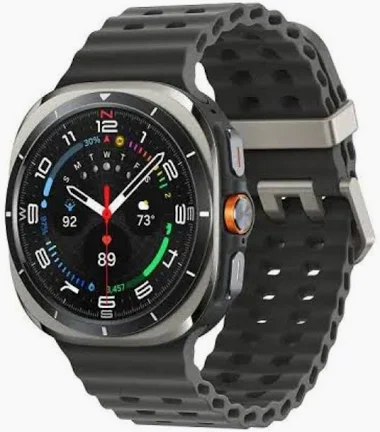
Samsung's flagship adventure watch: a 47mm titanium case, sapphire crystal, 590mAh battery and the 3nm Exynos W1000 — built to MIL-STD-810H with 10ATM water resistance.
LYNIO
Wear OS ✓
Google's watch platform

Bluetooth ✓
Wireless pairing
Google Play Store ✓
Install Lynio Watch
About the Galaxy Watch Ultra
The Galaxy Watch Ultra is Samsung's toughest smartwatch: a 47mm titanium case, sapphire crystal, and a 1.5" Super AMOLED display bright enough for direct sunlight. Inside sit the 3nm Exynos W1000 and a 590mAh battery that clears multi-day use, while dual-frequency GPS, 10ATM water resistance and MIL-STD-810H certification handle trails, open water and everything in between.
Officially, Samsung pairs the Watch Ultra only with Android phones through the Galaxy Wearable app — there is no native iPhone support. Lynio closes that gap: install Lynio Watch from the Play Store on the watch, pair over Bluetooth, and your iPhone handles calls, notifications, contacts and health from then on. For first-time setup you may need brief access to an Android phone, and the in-app guide walks you through it.
The Watch Ultra sits in Lynio's Optimized tier — call routing through the watch speaker, caller ID with your full iPhone address book, Apple Health sync and silent auto-reconnect are all tested specifically on this model.
Connect in 3 Steps
Install Lynio Watch on your Galaxy Watch Ultra
Open the Google Play Store on your Galaxy Watch Ultra, search "Lynio Watch" and tap Install. Your watch's Bluetooth will handle the rest.
Follow the in-app pairing guide
Open Lynio on your iPhone. It walks you through pairing step by step — takes about 2 minutes.
What You Get After Pairing
Calls on your wrist
iPhone notifications
Caller ID & contacts
Health → Apple Health
Music control
Auto reconnect