Updated July 6, 2026
How to Connect Galaxy Watch FE to Your iPhone.
Yes — the Galaxy Watch FE works with iPhone. Pair it with the Lynio app and you get calls, notifications, contacts and health sync in about 3 minutes.
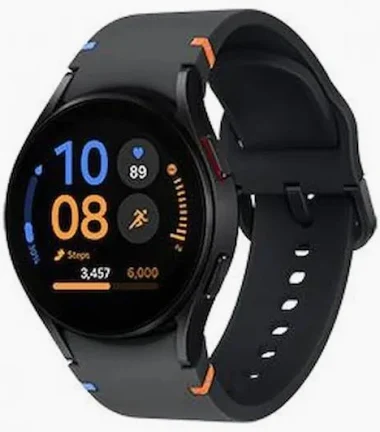
Samsung's most affordable Wear OS watch: the 40mm Fan Edition pairs the proven Exynos W920 with sapphire crystal glass and the full Samsung health suite.
LYNIO
Wear OS ✓
Google's watch platform

Bluetooth ✓
Wireless pairing
Google Play Store ✓
Install Lynio Watch
About the Galaxy Watch FE
The Galaxy Watch FE (2024) is Samsung's budget entry into Wear OS: a 40mm case with sapphire crystal glass, the proven Exynos W920, a 247mAh battery and the same core health suite as its pricier siblings.
Officially it pairs only with Android phones via Galaxy Wearable — Samsung doesn't support iPhones. Lynio makes the FE work with iPhone anyway: install Lynio Watch from the watch's Play Store, pair over Bluetooth, and your iPhone handles everything day to day. You may need brief access to an Android phone for first-time setup.
The Watch FE is in Lynio's Optimized tier, so notifications, calls, contacts and Apple Health sync are all verified on this model — a lot of smartwatch for the money when paired with an iPhone.
Connect in 3 Steps
Install Lynio Watch on your Galaxy Watch FE
Open the Google Play Store on your Galaxy Watch FE, search "Lynio Watch" and tap Install. Your watch's Bluetooth will handle the rest.
Follow the in-app pairing guide
Open Lynio on your iPhone. It walks you through pairing step by step — takes about 2 minutes.
What You Get After Pairing
Calls on your wrist
iPhone notifications
Caller ID & contacts
Health → Apple Health
Music control
Auto reconnect