Updated July 6, 2026
How to Connect Galaxy Watch 8 Classic to Your iPhone.
Yes — the Galaxy Watch 8 Classic works with iPhone. Pair it with the Lynio app and you get calls, notifications, contacts and health sync in about 3 minutes.
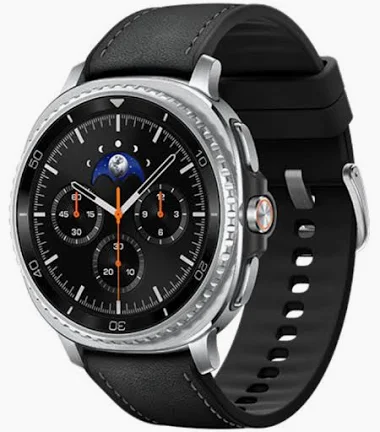
The 2025 Classic brings back Samsung's signature rotating bezel in a 46mm stainless steel cushion case, powered by the 3nm Exynos W1000 with a 445mAh battery.
LYNIO
Wear OS ✓
Google's watch platform

Bluetooth ✓
Wireless pairing
Google Play Store ✓
Install Lynio Watch
About the Galaxy Watch 8 Classic
The Galaxy Watch 8 Classic (2025) brings back Samsung's signature physical rotating bezel in a 46mm stainless steel case with the new cushion design. It runs the 3nm Exynos W1000 with a 445mAh battery — roughly two full days per charge in independent testing — on Samsung's latest One UI Watch.
Like every Galaxy Watch, the 8 Classic officially requires an Android phone with Galaxy Wearable for setup; iPhone doesn't appear on Samsung's compatibility list. With Lynio on your iPhone and Lynio Watch installed from the Play Store on the watch, pairing takes about three minutes — brief access to an Android phone may be needed once, depending on the watch's setup state.
The rotating bezel is genuinely useful with Lynio: scroll through mirrored iPhone notifications without smudging the display. As an Optimized model, calls, contacts, Apple Health sync and auto-reconnect are all tuned for the 8 Classic.
Connect in 3 Steps
Install Lynio Watch on your Galaxy Watch 8 Classic
Open the Google Play Store on your Galaxy Watch 8 Classic, search "Lynio Watch" and tap Install. Your watch's Bluetooth will handle the rest.
Follow the in-app pairing guide
Open Lynio on your iPhone. It walks you through pairing step by step — takes about 2 minutes.
What You Get After Pairing
Calls on your wrist
iPhone notifications
Caller ID & contacts
Health → Apple Health
Music control
Auto reconnect