Updated July 6, 2026
How to Connect Galaxy Watch 6 to Your iPhone.
Yes — the Galaxy Watch 6 works with iPhone. Pair it with the Lynio app and you get calls, notifications, contacts and health sync in about 3 minutes.
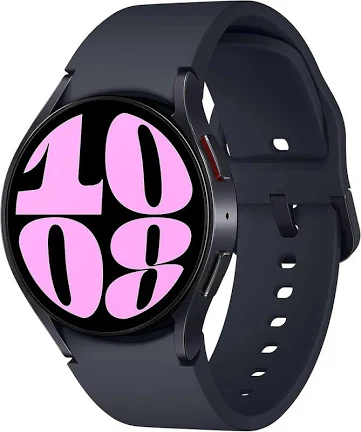
The Galaxy Watch 6 slimmed the bezel and grew the display over the Watch 5, with the faster Exynos W930 and 300mAh/425mAh batteries in 40mm and 44mm cases.
LYNIO
Wear OS ✓
Google's watch platform

Bluetooth ✓
Wireless pairing
Google Play Store ✓
Install Lynio Watch
About the Galaxy Watch 6
The Galaxy Watch 6 (2023) slimmed the bezel and enlarged the display over the Watch 5, moved to the faster Exynos W930, and kept the familiar 40mm/44mm sizing with 300mAh and 425mAh batteries.
Like the rest of the line, it officially supports only Android phones through Galaxy Wearable. Lynio is the iPhone bridge: Lynio Watch installs from the Play Store on the watch itself, pairing takes about three minutes, and afterwards your iPhone owns calls, notifications, contacts and Apple Health sync. Brief Android access may be needed once during setup.
The Watch 6 is Optimized in Lynio — the full feature set, including silent auto-reconnect when you walk back into Bluetooth range, is tested on this model.
Connect in 3 Steps
Install Lynio Watch on your Galaxy Watch 6
Open the Google Play Store on your Galaxy Watch 6, search "Lynio Watch" and tap Install. Your watch's Bluetooth will handle the rest.
Follow the in-app pairing guide
Open Lynio on your iPhone. It walks you through pairing step by step — takes about 2 minutes.
What You Get After Pairing
Calls on your wrist
iPhone notifications
Caller ID & contacts
Health → Apple Health
Music control
Auto reconnect