Updated July 6, 2026
How to Connect Galaxy Watch 6 Classic to Your iPhone.
Yes — the Galaxy Watch 6 Classic works with iPhone. Pair it with the Lynio app and you get calls, notifications, contacts and health sync in about 3 minutes.
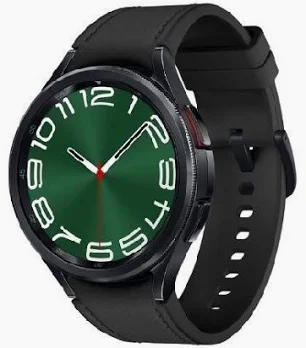
The 2023 Classic brought back the beloved rotating bezel in 43mm and 47mm stainless steel cases, backed by the Exynos W930 and Samsung's largest Classic displays to date.
LYNIO
Wear OS ✓
Google's watch platform

Bluetooth ✓
Wireless pairing
Google Play Store ✓
Install Lynio Watch
About the Galaxy Watch 6 Classic
The Galaxy Watch 6 Classic (2023) answered fan demand by bringing back the physical rotating bezel, wrapped in 43mm and 47mm stainless steel cases with Samsung's biggest Classic displays to that point. The Exynos W930 and 300/425mAh batteries keep it comfortably quick today.
Samsung never offered iPhone pairing for the 6 Classic — Galaxy Wearable is Android-only. With Lynio, the watch installs Lynio Watch from its own Play Store, pairs to your iPhone over Bluetooth, and mirrors calls, notifications, contacts and health data. First-time setup may briefly require an Android phone.
The rotating bezel makes triaging mirrored iPhone notifications especially pleasant, and as an Optimized model everything from call routing to auto-reconnect is tuned for the 6 Classic.
Connect in 3 Steps
Install Lynio Watch on your Galaxy Watch 6 Classic
Open the Google Play Store on your Galaxy Watch 6 Classic, search "Lynio Watch" and tap Install. Your watch's Bluetooth will handle the rest.
Follow the in-app pairing guide
Open Lynio on your iPhone. It walks you through pairing step by step — takes about 2 minutes.
What You Get After Pairing
Calls on your wrist
iPhone notifications
Caller ID & contacts
Health → Apple Health
Music control
Auto reconnect